
Guide
Blog visitor stats in Home Assistant, kept past Cloudflare's 31 days
Published · Updated
In my home lab blog guide, the visitor numbers came from Cloudflare’s analytics, through a script I ran by hand on my laptop. I only saw numbers when I ran it, and Cloudflare’s free plan keeps the detail for 31 days. Now the same script runs on the Raspberry Pi every hour, Home Assistant shows the numbers on a dashboard, and every finished day stays on the Pi, so the history outlives Cloudflare’s 31 days.

What you need
Section titled “What you need”| Part | Mine |
|---|---|
| Cloudflare’s proxy in front of the site | Free plan, set up in Step 6 of the blog guide |
| A script that reads Cloudflare’s GraphQL Analytics API | site-stats.sh: Bash, curl and jq. How it counts readers: Step 8 of the blog guide |
| Home Assistant OS | On a Raspberry Pi 5 |
| A place to run the script every hour | The Advanced SSH & Web Terminal app |
| Backups | Home Assistant’s own, every night, to the Pi’s SSD and Google Drive |
Step 1: A read-only token on the Pi
Section titled “Step 1: A read-only token on the Pi”The script needs a Cloudflare API token. Mine can only read, and only the one zone: an account API token with Zone → Analytics → Read for the zone. Mine has a few more Read permissions, but Analytics is the one the GraphQL API needs.
On the Pi the token lives in a file only root can read. My laptop keeps it in KDE Wallet and sends it over SSH through stdin, so it never shows up in a command line on the Pi:
# pi is a host entry in my SSH configprintf '%s' "$TOKEN" | ssh pi "sudo mkdir -p /homeassistant/site-stats && sudo sh -c 'umask 077 && cat > /homeassistant/site-stats/.cf-token'"/homeassistant in the SSH app is the same folder as /config in Home Assistant, so Home Assistant can read what the script writes there. It’s also in every backup.
Step 2: The script on the Pi
Section titled “Step 2: The script on the Pi”The same script runs on the laptop and on the Pi. It checks for /homeassistant to know which one it’s on, and keeps its cache somewhere different on each:
if [[ -d /homeassistant ]]; then CACHE=/homeassistant/site-stats/dayselse CACHE=$HOME/.cache/site-stats; fiCopy it over:
ssh pi 'cat > /tmp/s.sh' < site-stats.shssh pi 'sudo install -m 755 /tmp/s.sh /homeassistant/site-stats/site-stats.sh'On the Pi, site-stats.sh update does this:
- Works out the last 30 days, midnight to midnight in my time zone, plus today so far.
- Takes every day before yesterday from the cache. Only today, yesterday and any day not cached yet go to Cloudflare, one query per day, 5 at a time.
- Saves each newly fetched day before yesterday in the cache, gzipped. It never asks Cloudflare for that day again.
- Sorts readers from bots, feed readers and scripts, the same way as on the laptop.
- Writes
stats.json, about 8 KB. It writes a temp file and renames it, so Home Assistant never reads half a file.
Once the older days are cached, a run takes about 2 seconds and makes 2 calls to Cloudflare. Here’s stats.json, cut down to one item per list:
{ "time": "2026-10-26T01:26:15Z", "today": "2026-10-26", "days": [ { "date": "2026-10-26", "blog": { "views": 74, "visits": 65 }, "jacq": { "views": 1, "visits": 1 } } ], "w7": { "readers": { "blog": { "views": 341, "visits": 290 }, "jacq": { "views": 16, "visits": 14 } }, "top": [ { "site": "blog", "path": "/guides/atom-echo-own-firmware/", "views": 114 } ], "who": [ { "label": "🟠 old or fake browsers", "count": 1310, "top": "Chrome 866, Safari 398, Firefox 46" } ], "files": [ { "file": "robots.txt", "count": 367, "top": "Search Engine Crawler 94, Search Engine Optimization 47, Chrome 38" } ], "bots": [ { "category": "Search Engine Crawler", "count": 213 } ], "countries": [ { "country": "US", "views": 174 } ] }}days has 30 entries, oldest first, and w30 is the same as w7 for 30 days. jacq is the home page site, blog is this blog.
Two things to know:
- Until 26 October the days were UTC days, so “today” started at 10 am my time. Now they’re local days. Cloudflare’s API takes any start and end time, so the script asks for midnight to midnight in my time zone.
- On the Pi, only the home IP address is left out. The laptop also leaves out the network it’s on, but the Pi can’t know where the laptop is. So when I read the blog away from home, I count as a reader on the dashboard.
Step 3: Run it every hour
Section titled “Step 3: Run it every hour”The SSH app has cron, but it doesn’t start crond, and anything set up by hand inside the app is gone after it restarts or updates. So the script has a start command that adds its cron line and starts crond:
start() { { crontab -l 2>/dev/null | grep -v 'site-stats.sh' || true echo "7 * * * * /homeassistant/site-stats/site-stats.sh update > /homeassistant/site-stats/last-run.log 2>&1"; } | crontab - pgrep -x crond > /dev/null || crond}The app’s init_commands option runs commands as root every time the app starts. In the app’s Configuration tab:
init_commands: - bash /homeassistant/site-stats/site-stats.sh startIt runs at 7 minutes past each hour, to give Cloudflare a few minutes to finish the last hour. The output of the last run, errors included, is in last-run.log.
Step 4: Sensors in Home Assistant
Section titled “Step 4: Sensors in Home Assistant”My Home Assistant loads one YAML file per topic from a packages folder (homeassistant: packages: !include_dir_named packages in configuration.yaml). The stats have their own file.
A command_line sensor reads stats.json every 5 minutes. Its state is the time the script collected the data, and the whole JSON goes into its attributes. I keep it out of the recorder, or Home Assistant would save 8 KB of attributes to its database every hour:
command_line:  - sensor:      name: Site stats data      unique_id: site_stats_data      command: "cat /config/site-stats/stats.json"      value_template: "{{ value_json.time }}"      device_class: timestamp      json_attributes: [today, days, w7, w30]      scan_interval: 300
recorder:  exclude:    entities:      - sensor.site_stats_data
Template sensors pick out the numbers. They’re trigger-based, so they update when the data sensor changes, and at startup:
template: - triggers: - trigger: state entity_id: sensor.site_stats_data - trigger: homeassistant event: start variables: days: "{{ state_attr('sensor.site_stats_data', 'days') or [] }}" sensor: - name: Blog readers today unique_id: blog_readers_today unit_of_measurement: page views state: "{{ days[-1].blog.views }}" availability: "{{ days | count > 0 }}" # One value per day, so its long-term statistics keep the daily history - name: Blog readers yesterday unique_id: blog_readers_yesterday unit_of_measurement: page views state_class: measurement state: "{{ days[-2].blog.views }}" availability: "{{ days | count > 1 }}"The others work the same way: readers in 7 and 30 days, the home page, robots.txt fetches, and pages fetched by bots Cloudflare puts in its AI categories. One more tells me when the script stops, with no new data for 3 hours:
template: - binary_sensor: - name: Site stats data stale unique_id: site_stats_data_stale device_class: problem state: >- {% set t = as_datetime(states('sensor.site_stats_data')) %} {{ t is none or now() - t > timedelta(hours=3) }}Step 5: The dashboard
Section titled “Step 5: The dashboard”A sections dashboard called Blog, in the sidebar. The numbers are tile cards:
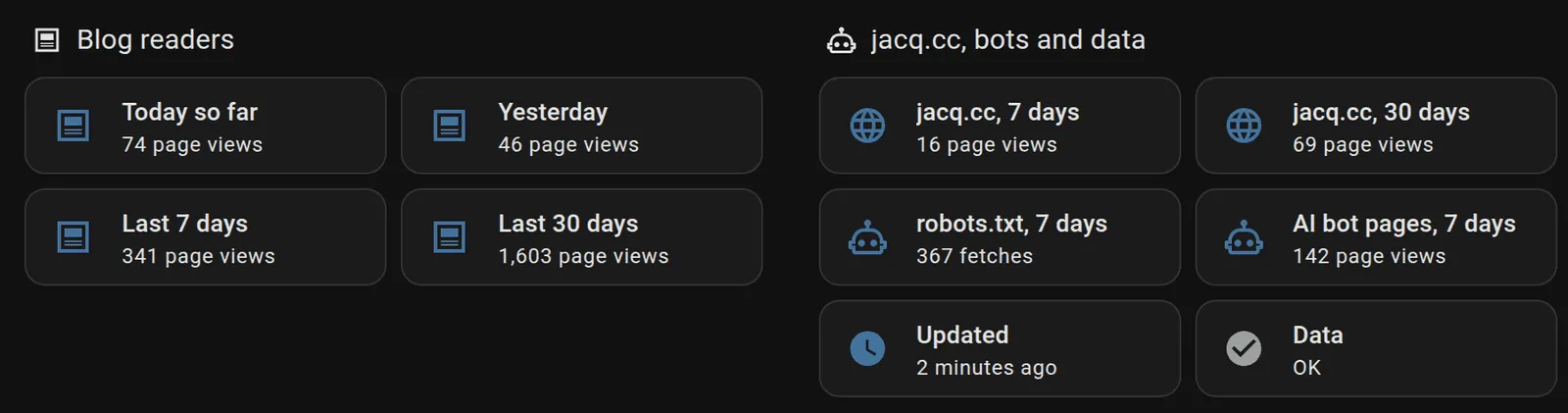
Readers on top. On the right: the home page, robots.txt, AI bots, and whether the data is fresh.
The tables are Markdown cards with a template. The readers-per-day table draws its bars with █ characters, 40 for the busiest day. Days before 11 October are left out: Cloudflare wasn’t in front of the blog yet.
{% set d = ((state_attr('sensor.site_stats_data', 'days') or []) | selectattr('date', 'ge', '2026-10-11') | list)[-14:] %}{% set mx = d | map(attribute='blog') | map(attribute='views') | list | max if d else 0 %}| Day | Blog | | jacq.cc ||:--|--:|:--|--:|{% for r in d | reverse -%}| {{ as_datetime(r.date).strftime('%a %d %b') }}{{ ' so far' if loop.first else '' }} | {{ r.blog.views }} | {{ '█' * ((r.blog.views * 40 / mx) | round(0, 'ceil') | int) if mx else '' }} | {{ r.jacq.views }} |{% endfor %}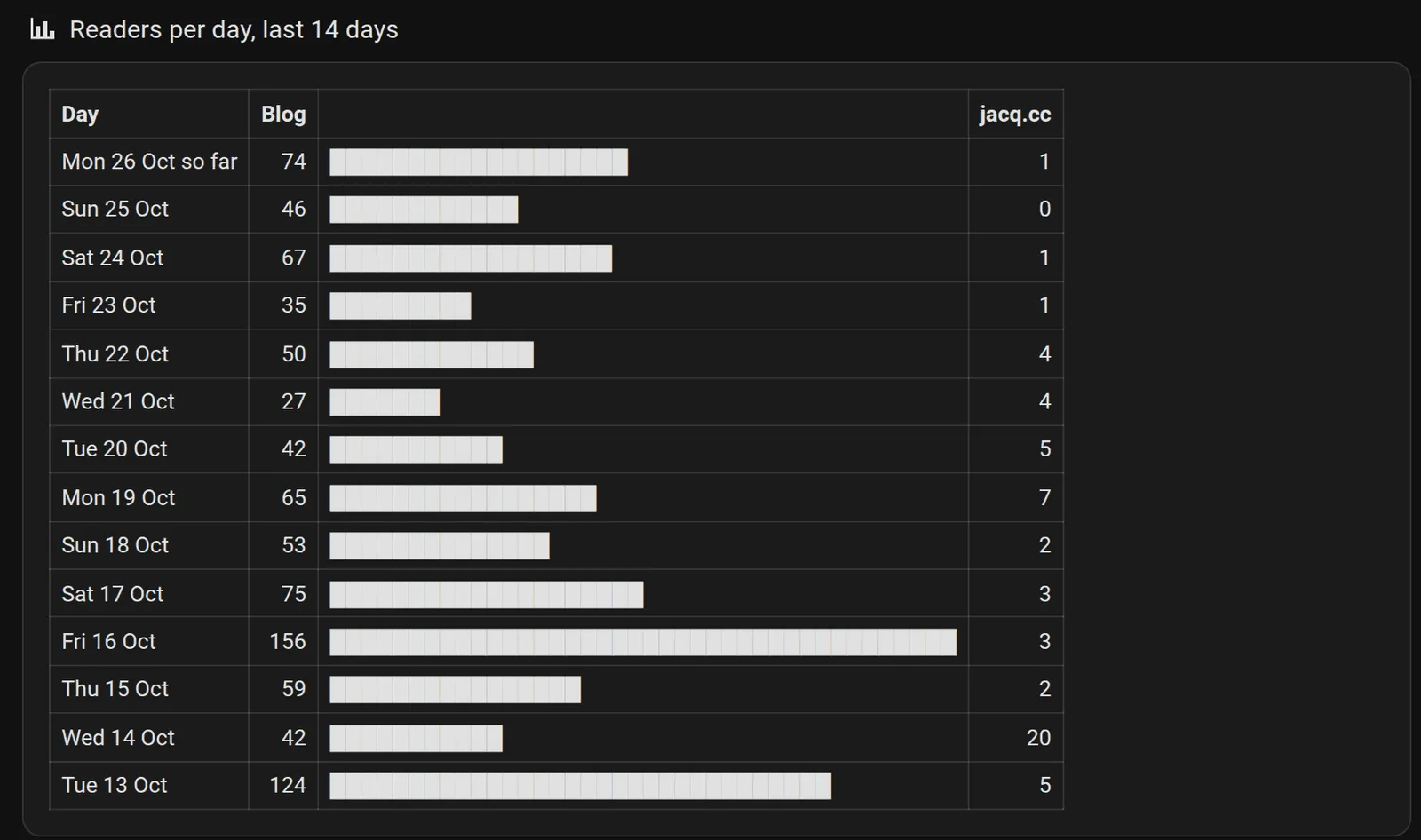
The last 14 days. 16 October had two new guides, one of them on Hacker News.
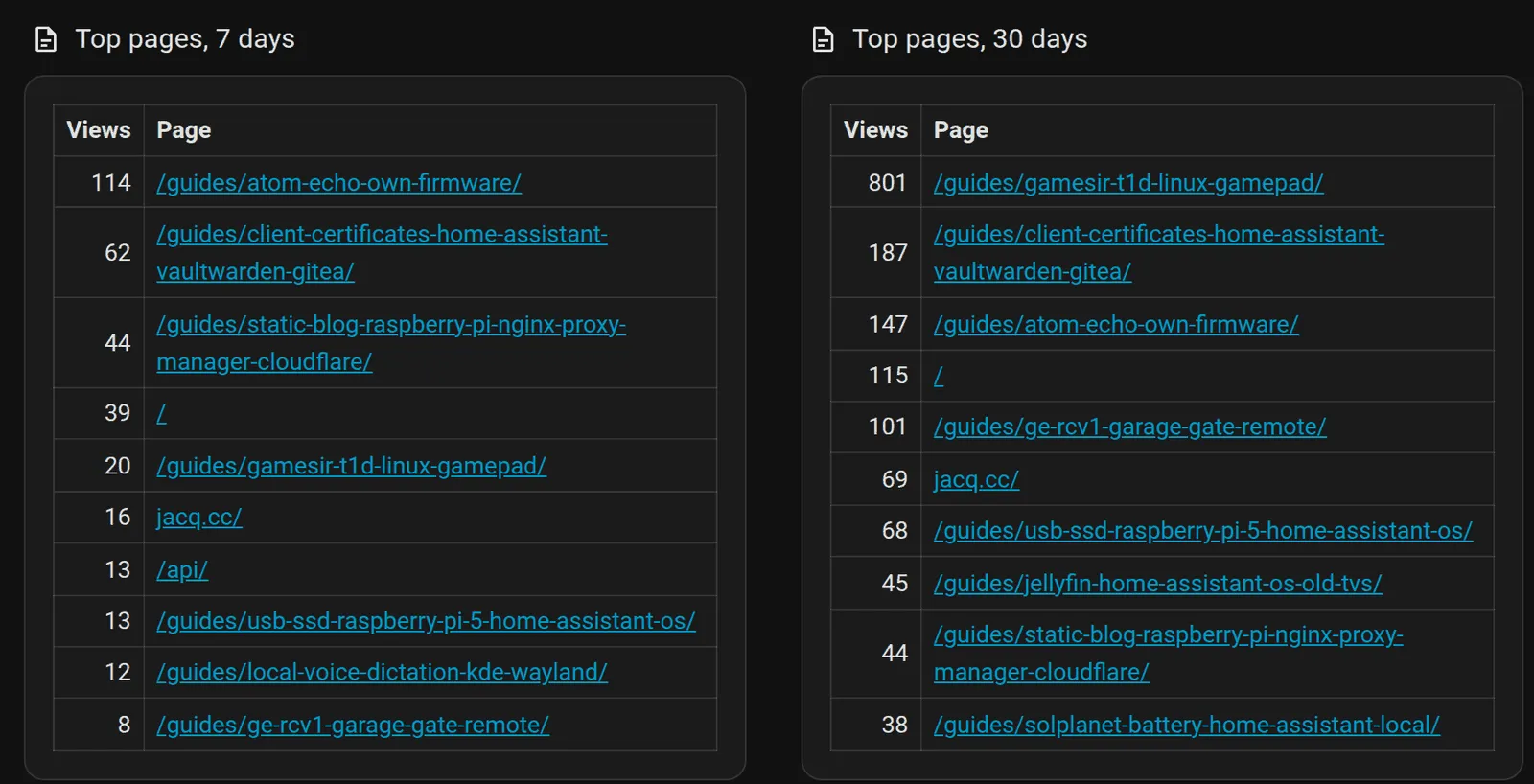
Top pages, from readers only. The links open the page.
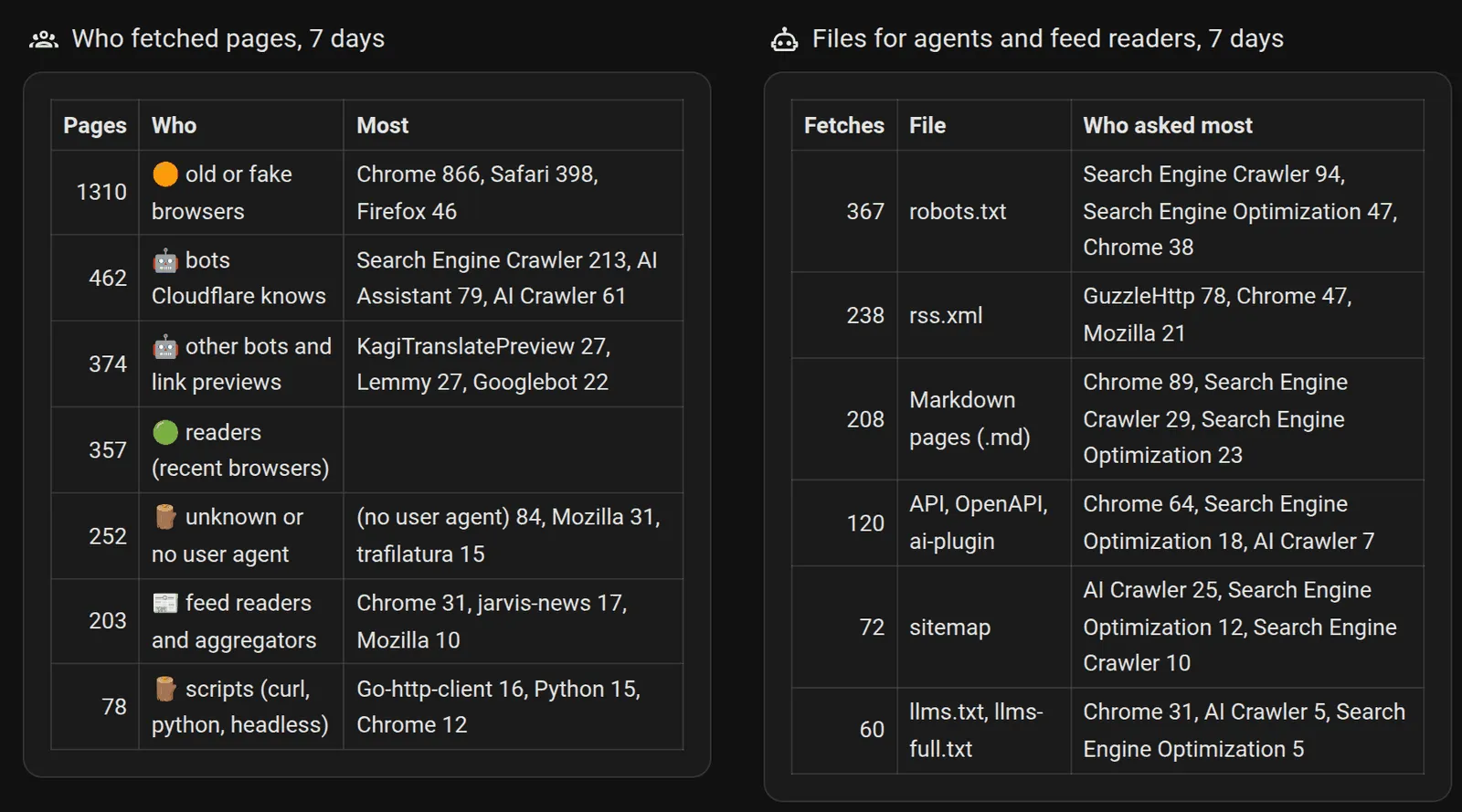
Everything else that came in 7 days. Readers fetched 357 of 3,036 pages.
How long it’s all kept
Section titled “How long it’s all kept”| Copy | Where | What’s in it | Kept for |
|---|---|---|---|
| Cloudflare’s detail | Cloudflare | Each request’s path, user agent, bot category and country | 31 days |
| Cloudflare’s daily totals | Cloudflare | Requests and page views per day, for the whole zone, with no bot split | 1 year |
stats.json |
The Pi | The last 30 days, sorted, for the dashboard | Rewritten every hour |
| Finished days | The Pi, in /homeassistant/site-stats/days/ |
Cloudflare’s answer for each day, gzipped | Forever: nothing deletes them |
| Sensor history | Home Assistant’s database | Every value of the stats sensors | 365 days (my recorder setting; the default is 10) |
| Long-term statistics | Home Assistant’s database | Blog readers yesterday, so one count a day | Forever: Home Assistant never purges them |
| Backups | The Pi’s SSD and Google Drive, encrypted | All of the above that’s on the Pi, as it was that night | 3 days on the SSD, 14 days on Google Drive |
The finished days are what outlives Cloudflare. A day is about 13 KB (28 days were 376 KB), so about 5 MB a year. The rows hold paths, user agents, bot categories and countries, never IP addresses.
Cloudflare’s 1-year daily totals don’t help here. They’re for the whole zone, and they can’t tell a reader from a bot, which is most of the traffic.
The backups only go back 14 days, but each one holds every day kept so far. If the Pi dies, the newest backup has everything up to that night, and the script fetches anything newer from Cloudflare, which still has 31 days.
What reads the old days today:
- Home Assistant’s long-term statistics for Blog readers yesterday. Its graph in History works for any range, even after the raw states are purged.
- Nothing else yet. The script reads at most 30 days. The older files are there for when I want more.
Sources
Section titled “Sources”- Home Assistant: Command line, Template (trigger-based sensors), Recorder, Packages, Markdown card, Tile card, long-term statistics, backups
- Advanced SSH & Web Terminal app (
init_commands) - Cloudflare: GraphQL Analytics API, its limits, creating an API token
Change history
- : First published.
This guide as plain Markdown, for LLMs and scripts: cloudflare-visitor-stats-home-assistant.md. All posts: API and Markdown.
Text, photos and drawings: CC BY 4.0. Code: MIT. Share and adapt them, crediting HomeLab Guides (blog.jacq.cc). Licence and privacy