Guide
Monitor a Solplanet battery locally in Home Assistant, with fault emails you can trust
Published · Updated
My home battery is a Solplanet system. Its Ai-Dongle, the inverter’s network module, answers on the local network, and a Home Assistant integration reads it every 60 seconds, with no cloud account in the path.
Getting the numbers in is easy. Trusting them is harder. The dongle reports the inverter as waiting while it’s producing 2.8 kW, drops off the network for minutes at a time, and locks everyone out if it’s asked too often. My first fault email sent 27 false alarms in 10 days. Here’s the setup and the automation I ended up with.
My system
Section titled “My system”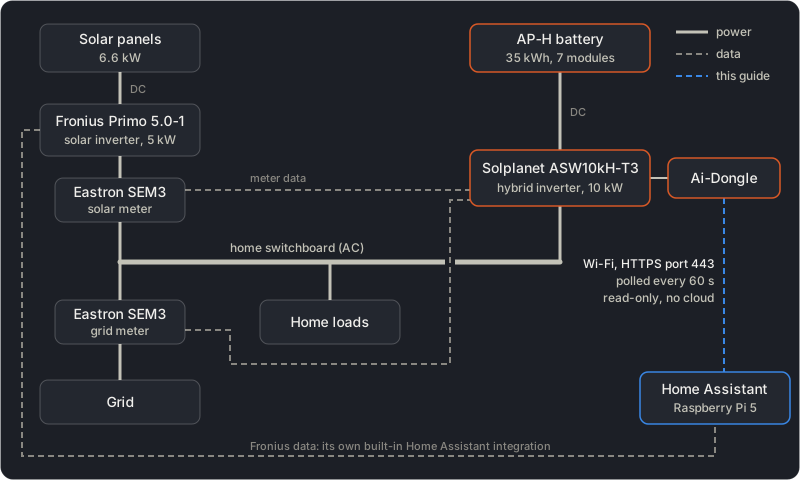
Power on the left, data on the right. This guide is about the dongle-to-Home Assistant link.
| Part | Model |
|---|---|
| Hybrid inverter | Solplanet ASW10kH-T3, 10 kW |
| Battery | Solplanet AP-H series, 35 kWh (7 modules) |
| Solar inverter | Fronius Primo 5.0-1, with 6.6 kW of panels |
| Meters | 2× Eastron SEM3: one on the Fronius output, one on the grid |
| Dongle | Solplanet Ai-Dongle, on Wi-Fi |
The system is AC-coupled. The panels feed the Fronius, which has its own built-in Home Assistant integration. The Solplanet inverter charges and discharges the battery on the AC side, and its two meters tell it what the Fronius makes and what goes to and from the grid.
Step 1: Install the integration
Section titled “Step 1: Install the integration”You need Home Assistant with HACS, and the dongle on your network.
Search HACS for “Solplanet”. Two integrations show up: the original by zbigniewmotyka, and calvinbui’s fork, which focuses on the newer “v2” dongle firmware. I use the fork, v1.1.0. Restart Home Assistant, then add it in Settings → Devices & services with the dongle’s IP address. Leave the update interval at 60 seconds (step 2 says why).
Mine speaks v2 over HTTPS on port 443. The integration finds that by itself.
Step 2: Don’t ask the dongle yourself
Section titled “Step 2: Don’t ask the dongle yourself”The Ai-Dongle has a rate limit. Ask it too often and it rejects every request, Home Assistant’s included, for a while. Home Assistant already polls it every 60 seconds, so a script of yours on top is how you’d trip it.
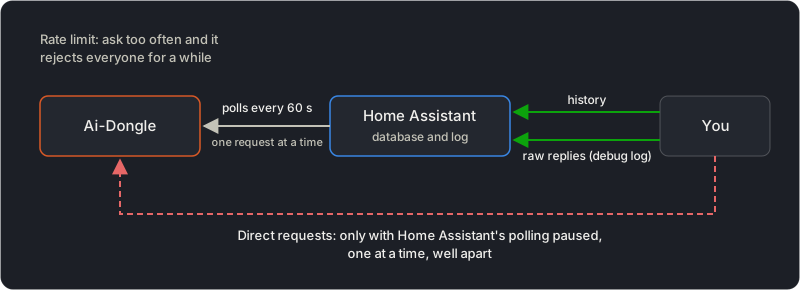
Read from Home Assistant, not from the dongle.
Everything is already in Home Assistant: the history of every entity, and, at debug level, every raw reply from the dongle. Turn that on without a restart, in Developer tools → Actions:
action: logger.set_leveldata: custom_components.solplanet: debugThe replies show up in Settings → System → Logs, base64-encoded (b'eyJ...'). Decode one with echo 'eyJ...' | base64 -d | jq ., then set the level back to warning.
Step 3: Turn on the dongle’s Wi-Fi signal sensor
Section titled “Step 3: Turn on the dongle’s Wi-Fi signal sensor”The dongle device has a WiFi signal strength sensor, disabled by default. Enable it on the dongle’s device page. It costs no extra requests: the integration fetches that value anyway, once an hour.
Mine reads -66 dBm, which is borderline (about -67 dBm is the usual limit for a reliable link). When the dongle drops out, its history shows whether Wi-Fi is to blame.
Step 4: The fault email
Section titled “Step 4: The fault email”Create an automation, switch to YAML (⋮ → Edit in YAML), and paste this. Replace the entity IDs with yours: the integration names them after your devices, so the inverter’s start with its model, asw10kh_t3_, and notify.email is your notifier.
alias: Solplanet battery/inverter fault emaildescription: >- Email me when the Solplanet inverter or battery reports a fault that lasts 5 min. Separate email when the dongle is unreachable for 1 h.triggers: - trigger: state id: fault entity_id: - sensor.battery_errors - sensor.battery_warnings - sensor.inverter_error_code - sensor.inverter_status - sensor.battery_communication_status not_to: - unavailable - unknown for: "00:05:00" - trigger: state id: unreachable entity_id: - sensor.inverter_status - sensor.battery_communication_status to: unavailable for: "01:00:00"actions: - choose: - conditions: - condition: trigger id: unreachable sequence: - action: smtp.send_message target: entity_id: notify.email data: title: Solplanet dongle unreachable for 1 h message: >- Home Assistant can't read the Solplanet Ai-Dongle. This means no data, not a fault: the inverter and battery most likely keep running. Check the dongle's Wi-Fi signal, or reboot it. default: - if: - condition: not conditions: - condition: and conditions: - condition: state entity_id: sensor.battery_errors state: [No errors, unavailable, unknown] - condition: state entity_id: sensor.battery_warnings state: [No warnings, unavailable, unknown] - condition: state entity_id: sensor.inverter_error_code state: [No error, unavailable, unknown] - condition: state entity_id: sensor.inverter_status state: [Normal, unavailable, unknown] - condition: state entity_id: sensor.battery_communication_status state: [Normal, unavailable, unknown] then: - action: smtp.send_message target: entity_id: notify.email data: title: Solplanet fault message: >- Inverter: {{ states('sensor.inverter_status') }}, {{ states('sensor.inverter_error_code') }}. Battery: {{ states('sensor.battery_errors') }}, {{ states('sensor.battery_warnings') }}, comms {{ states('sensor.battery_communication_status') }}, {{ states('sensor.battery_state_of_charge') }}%.mode: singlemax_exceeded: silentsmtp.send_message needs Home Assistant 2026.8 or newer. With another notifier, use notify.send_message with the same target and data.
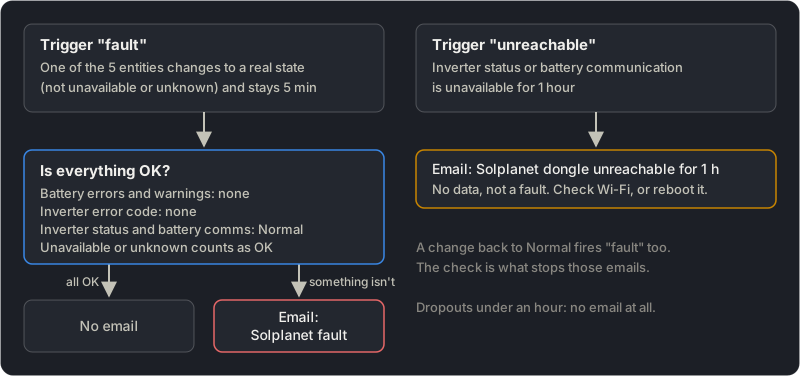
Two triggers, one check. A change back to Normal fires “fault” too; the check is what stops those emails.
Why it looks like this
Section titled “Why it looks like this”“Wait” for one poll
Section titled ““Wait” for one poll”The first version emailed on any change to a bad state. In 10 days it sent 27 emails saying the inverter had gone from Normal to Wait. Each time, the dongle reported Wait for a single 60-second poll, and the next poll was Normal again. A real Wait means no output, but the inverter was producing 2,779 W during one of them. None of the 27 was real.
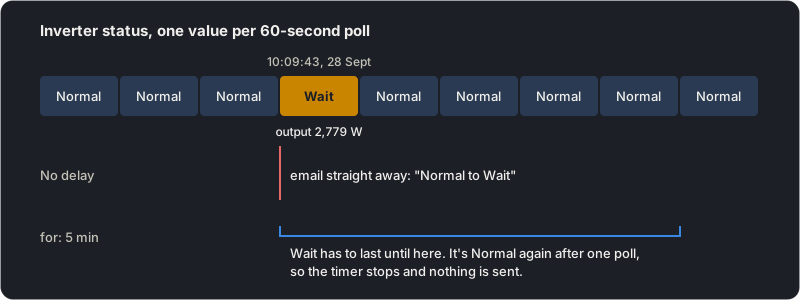
One poll of Wait, while the inverter produced 2.8 kW.
Fix: for: "00:05:00", so a bad state has to last 5 minutes. The trade-off: a real fault that clears within 5 minutes no longer emails.
Unavailable is not a fault
Section titled “Unavailable is not a fault”On 12 October I got 11 fault emails in one afternoon. None was a fault. Home Assistant lost contact with the dongle from 14:15 to 21:51, and the entities kept flipping to unavailable for 1 to 10 minutes at a time.
Five minutes wasn’t enough because of the integration’s back-off. After 3 failed polls in a row, it only tries again every 10 minutes, so the entities stay unavailable for at least 10 minutes, and a 5-minute trigger fires every time.
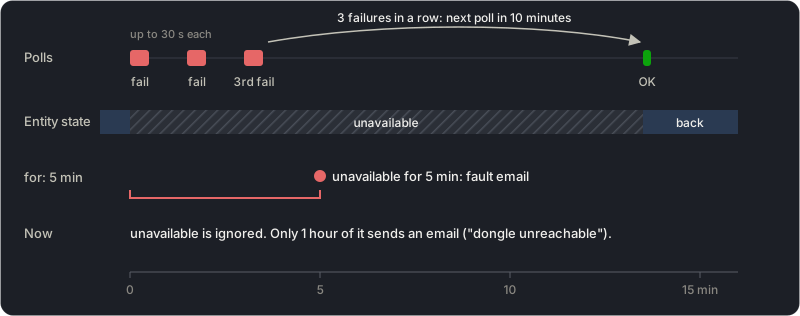
Three failures, then a 10-minute wait: long enough to beat a 5-minute trigger.
Fix: the fault trigger ignores changes to unavailable and unknown (not_to), and the check counts them as OK. A dongle that stays silent is a different problem, so the unreachable trigger sends one separate email after an hour. The longest gap that day was 38 minutes.
The system itself kept working the whole time:
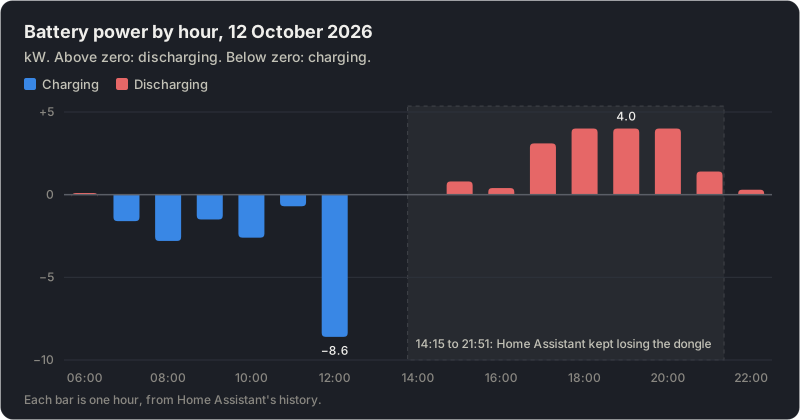
Battery power on 12 October, from Home Assistant’s history. Only the data link was down.
I haven’t found the cause yet. The dongle answered pings slowly the next day (64 ms on average, against 1 to 5 ms for the Wi-Fi access points), so its Wi-Fi link is my suspect. The automation doesn’t need to know.
Sources
Section titled “Sources”- calvinbui/home-assistant-solplanet v1.1.0: the back-off in
coordinator.py, and its wiki - The original integration: zbigniewmotyka/home-assistant-solplanet
- Home Assistant docs: state trigger (
not_to), logger.set_level, smtp.send_message
Change history
- : First published.
This guide as plain Markdown, for LLMs and scripts: solplanet-battery-home-assistant-local.md. All posts: API and Markdown.
Text, photos and drawings: CC BY 4.0. Code: MIT. Share and adapt them, crediting HomeLab Guides (blog.jacq.cc). Licence and privacy