Guide
Dictation on Linux with Handy, and tidy text with OpenCode Go
Published · Updated
I wanted the feature that phones have had for years: hit a key, speak, and the words show up in the focused window. The laptop’s speech recognition is handled by the open-source Handy. The sophisticated premium app, Wispr Flow, transmits all recordings to its servers and lacks a Linux build.
Two parts weren’t covered anywhere in one place. Handy requires a helper with access to /dev/uinput since one program cannot type into another on KDE Plasma under Wayland. Additionally, OpenCode Go, the $10-per-month subscription I already had, is incompatible with Handy’s optional clean-up, which uses a language model to eliminate “ums” and correct punctuation. Go rejects all of Handy’s requests. The majority of this article focuses on the second section, including the little local proxy that resolves it, how it uses opencode’s own sign-in, and how to maintain that sign-in.
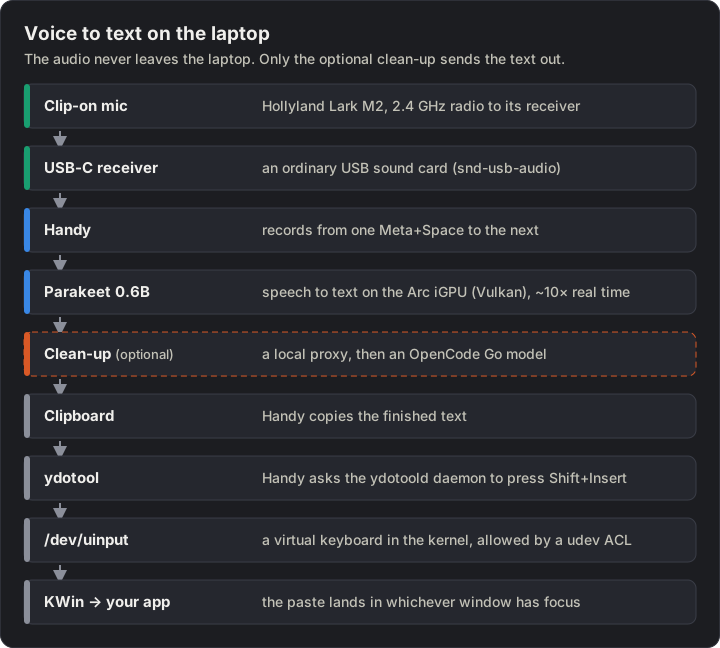
The whole path, top to bottom. Only the dashed step is optional, and it’s the only one that sends anything out: text, never audio.
What you need
Section titled “What you need”| Part | Notes |
|---|---|
| A Linux PC with KDE Plasma on Wayland | Mine: a 2026 laptop with an Intel Core Ultra X7 358H, its built-in Arc B390 GPU and 32 GB of RAM |
| Handy 0.9.8 | MIT licence. A .deb from GitHub; not in apt |
ydotool |
In Ubuntu’s apt (1.0.4 on 26.04) |
| A microphone | The built-in one works. A clip-on works better (below) |
| Optional: OpenCode Go | For the clean-up: $10 a month, plus opencode 2.x for the sign-in, and Python 3 for the proxy |
Step 1: Install Handy and ydotool
Section titled “Step 1: Install Handy and ydotool”v=0.9.8curl -LO https://github.com/cjpais/Handy/releases/download/v$v/Handy_${v}_amd64.debsudo apt install ./Handy_${v}_amd64.deb ydotoolUse apt, not dpkg -i, so the dependencies come along. Handy notices new releases later but doesn’t install them: download the next .deb the same way.
Step 2: Let ydotool create a virtual keyboard
Section titled “Step 2: Let ydotool create a virtual keyboard”Wayland stops one app from typing into another, so Handy hands the text to a helper. On KDE, kwtype isn’t packaged for Ubuntu, wtype needs a protocol KWin doesn’t offer, and dotool isn’t in apt. ydotool works: it makes a virtual keyboard through the kernel’s /dev/uinput.
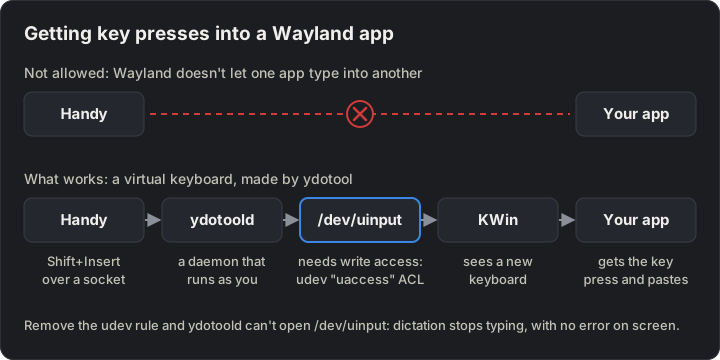
Why Handy needs a helper, and where the udev rule fits in.
Its daemon, ydotoold, runs as your user, so your user needs write access to /dev/uinput. I already had a udev rule for that from my GameSir controller bridge. It’s one line:
KERNEL=="uinput", SUBSYSTEM=="misc", OPTIONS+="static_node=uinput", TAG+="uaccess"uaccess gives whoever is logged in at the desktop an ACL on /dev/uinput: no sudo, no group change. That’s narrower than joining the input group, which would let any program you run read every keyboard.
curl -o 60-uinput-uaccess.rules https://blog.jacq.cc/gamesir-t1d/60-t1d-bridge-uinput.rulessudo install -m 644 60-uinput-uaccess.rules /etc/udev/rules.d/sudo udevadm control --reload && sudo udevadm trigger --name-match=uinputgetfacl /dev/uinput # look for a user:<you>:rw- linesystemctl --user enable --now ydotoolKeep the file’s number below 73: systemd applies uaccess in 73-seat-late.rules. If the rule ever goes, dictation stops typing with no error you’d notice, so check getfacl /dev/uinput first when text doesn’t appear.
Step 3: Pick the model and the shortcut
Section titled “Step 3: Pick the model and the shortcut”- Open Handy, allow microphone access, and on the Models page pick Parakeet Unified EN 0.6B: NVIDIA’s English-only model, which shows the text live while you talk.
- Advanced: turn on Launch on Startup and Start Hidden. Without them, the shortcut does nothing after a reboot until you open Handy by hand.
- General → Transcribe Shortcut →
Meta+Space(Handy calls it Super), which is free in KDE. The default,Ctrl+Space, clashes with autocomplete in VS Code.
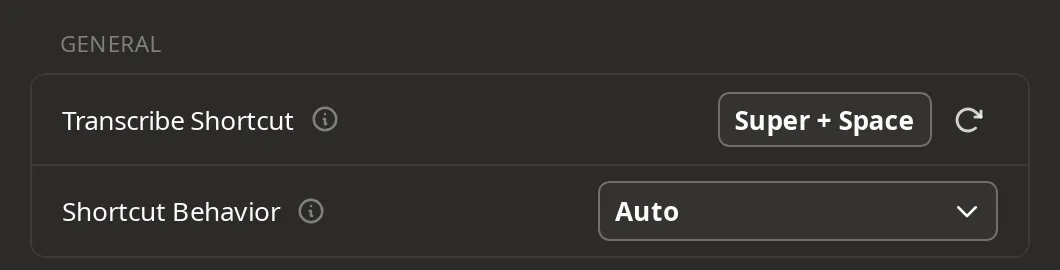
Handy’s General page.
Handy’s README says that on Wayland the shortcut has to come from the desktop. Handy’s own worked for me anyway. If it stops firing in some app, change Handy’s shortcut to something else, then add a KDE one: System Settings → Keyboard → Shortcuts → Add New → Command or Script, command handy --toggle-transcription.
Step 4: Pick the paste method
Section titled “Step 4: Pick the paste method”Handy can type the text key by key (Direct), or put it on the clipboard and send a paste key. Direct was slow here: ydotool types one key at a time.
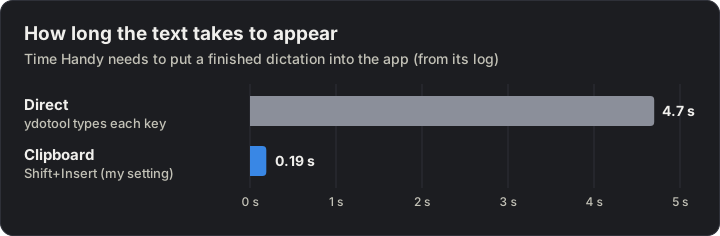
From Handy’s log.
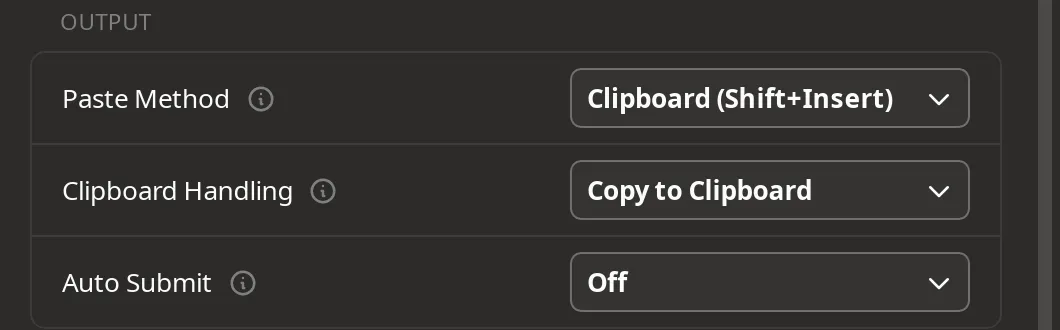
Advanced → Output.
I use Clipboard (Shift+Insert), the paste key I’ve used since DOS. It works in editors, browsers, KDE apps and LibreOffice. The catch: in a terminal, Shift+Insert pastes the text you last highlighted, not the clipboard. For terminal-heavy work, pick Clipboard (Ctrl+Shift+V).
Step 5 (optional): Tidy the text with OpenCode Go
Section titled “Step 5 (optional): Tidy the text with OpenCode Go”Handy’s post-processing sends the finished transcript to a language model, with a prompt, and pastes the reply instead of the raw text. It has its own hotkey, so I keep both: Meta+Space for plain dictation, Ctrl+Shift+Space for dictation plus clean-up, about 2 seconds slower. Parakeet writes what you said:
um so can you uh book the the plumber for thursday at like three thirty pm and tell him the hot water system is leaking near the uh tempering valveThe clean-up pastes this instead:
Can you book the plumber for Thursday at 3:30 pm and tell him the hot water system is leaking near the tempering valve?I point it at OpenCode Go, the $10-a-month subscription for opencode’s coding models. Its docs say most of its models aren’t trained on your prompts and keep nothing. Getting Handy to use it took two problems, a proxy and a timer.
What Handy sends
Section titled “What Handy sends”I read Handy 0.9.8’s source (llm_client.rs) to see exactly what its Custom provider sends:
POST <base URL>/chat/completions, OpenAI style:{model, messages, stream: false, reasoning_effort: "none"}, with one user message: your prompt, with${output}replaced by the transcript.- If the server answers 400 or 422, Handy tries once more without
reasoning_effort, and remembers that until it quits. - Headers:
Authorization: Bearer <API key>, its ownUser-Agent,RefererandX-Title. There’s no setting for other headers. - No
max_tokens, no temperature, no timeout. Any<think>block is cut from the reply.
Go serves each model on one of three endpoints: /chat/completions, /responses or /messages. Handy calls only the first, so only some Go models work with it. Go’s docs list qwen3.8-flash under /messages, but it answers on /chat/completions too.
Problem 1: Go needs a header Handy can’t send
Section titled “Problem 1: Go needs a header Handy can’t send”You can see this one without an account:
curl -s https://opencode.ai/inference/go/v1/chat/completions \ -H 'Content-Type: application/json' \ -d '{"model": "qwen3.8-flash", "messages": [{"role": "user", "content": "hi"}]}'{"type":"error","error":{"type":"MissingSessionID","message":"Request is missing x-opencode-session and cannot be routed efficiently. Please see https://opencode.ai/docs/go/#where-can-i-use-it"}}That’s HTTP 400. Go’s docs say other clients should send a session id and their own User-Agent; the API requires the session id. Add -H 'x-opencode-session: test-1' and the answer becomes a 401, “Go requires a credential”: the session check comes before the key check. Handy can’t add the header, so something between Handy and Go has to.
Problem 2: No API key to copy
Section titled “Problem 2: No API key to copy”Go’s docs say to copy your API key from the Console. In October 2026 the Console’s Overview and Go pages had no such button. Keys come from Settings → Service accounts, which I haven’t tried. What I already had was opencode’s own sign-in: opencode auth login opencode, pick OpenCode Console account, and approve the code in the browser. Its token works against Go.
Finding that token took a while. opencode 2.x doesn’t keep sign-ins in ~/.local/share/opencode/auth.json, the file older docs point to: that was version 1. Version 2 keeps them in a SQLite database, ~/.local/share/opencode/opencode.db, table credential. The supported way out is opencode auth export, which prints every sign-in with its secrets as JSON. To see the shape without printing any secret:
opencode auth export opencode | jq 'walk(if type == "string" and length > 12 then "<\(length) chars>" else . end)'[ { "id": "<31 chars>", "integrationID": "opencode", "label": "Default", "active": true, "value": { "type": "oauth", "methodID": "device", "refresh": "<39 chars>", "access": "<39 chars>", "expires": <milliseconds since 1970>, "metadata": { … } } } ]access is what Go takes as the bearer token, and expires is 30 days after you sign in. opencode 2.x is one Bun binary with its JavaScript inside as plain text, so grep -a on the binary is how I found the rest: where it renews, and what it sends.
The proxy
Section titled “The proxy”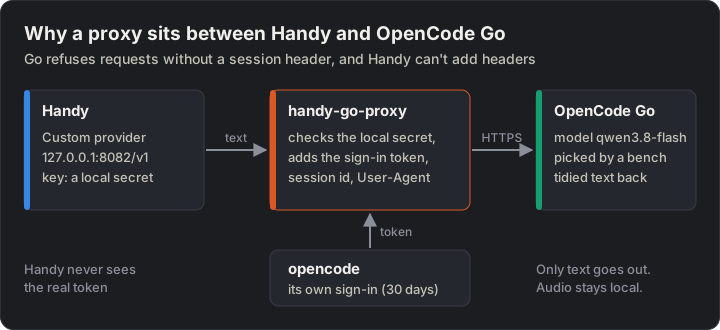
The proxy borrows opencode’s own sign-in, so there’s no API key to copy around.
handy-go-proxy.py is about 160 lines of Python, standard library only (MIT). It:
- listens on
127.0.0.1:8082only, and refuses requests without the local secret or with anotherHost, so a web page in your browser can’t use it; - reads the token with
opencode auth export opencodeat the first request, and again when the token has expired or Go answers 401; - adds
x-opencode-session(one id per day) and aUser-Agentthat says what it is; - passes on only
POST /v1/chat/completionsandGET /v1/models, the second so that Handy’s model list fills in; - logs one line per request (model, status, time), never the text or the token.
Set it up
Section titled “Set it up”opencode auth login opencode # pick "OpenCode Console account"mkdir -p ~/.local/bin ~/.config/handy-go-proxy ~/.config/systemd/usercurl -o ~/.local/bin/handy-go-proxy.py https://blog.jacq.cc/handy-go-proxy/handy-go-proxy.pycurl -o ~/.config/systemd/user/handy-go-proxy.service https://blog.jacq.cc/handy-go-proxy/handy-go-proxy.service(umask 077; head -c 24 /dev/urandom | base64 | tr -d '/+=' > ~/.config/handy-go-proxy/secret)Check that the unit’s PATH line has the folder opencode is in (dirname "$(command -v opencode)"), then start it:
systemctl --user daemon-reloadsystemctl --user enable --now handy-go-proxycurl -s http://127.0.0.1:8082/health # okHook it up to Handy
Section titled “Hook it up to Handy”On the Post Process page:
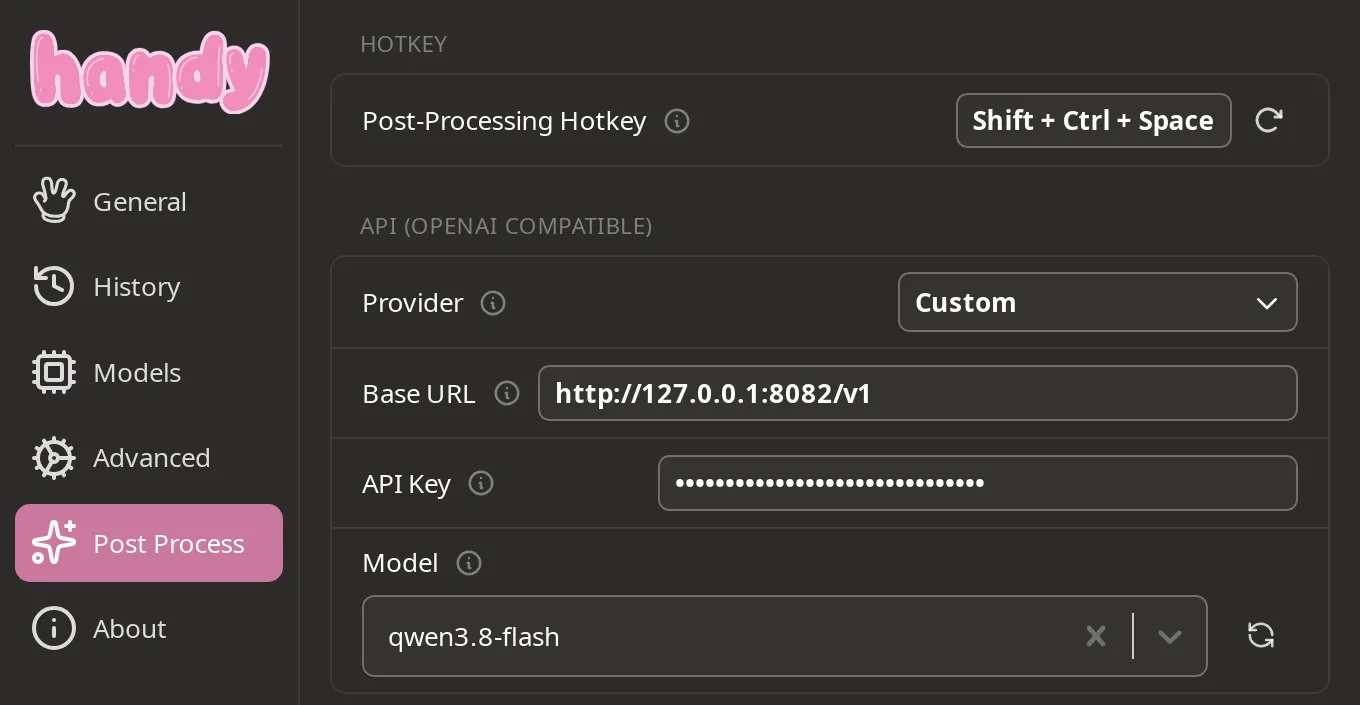
Handy’s Post Process page, set up for the proxy.
| Setting | Value |
|---|---|
| Provider | Custom |
| Base URL | http://127.0.0.1:8082/v1 |
| API Key | The contents of ~/.config/handy-go-proxy/secret, not a Go key |
| Model | qwen3.8-flash (why) |
The refresh button next to Model lists every Go model, including the ones Handy can’t use. Below it is the prompt. Handy’s built-in one, Improve Transcriptions, works well: it asks the model to fix spelling and punctuation, turn number words into digits and spoken punctuation into symbols, drop filler words, and clean up a question instead of answering it. Mine is a shorter version that also asks for Australian spelling.
If you ever script these settings: Handy writes its settings file (~/.local/share/com.pais.handy/settings_store.json) back when it quits, so quit Handy before editing the file.
Check it works
Section titled “Check it works”One request through the proxy, the way Handy sends it:
curl -s http://127.0.0.1:8082/v1/chat/completions \ -H "Authorization: Bearer $(cat ~/.config/handy-go-proxy/secret)" \ -H 'Content-Type: application/json' \ -d '{"model": "qwen3.8-flash", "reasoning_effort": "none", "messages": [{"role": "user", "content": "Remove filler words and turn spoken punctuation into symbols. Return only the text: so um the the meeting is at uh half past two on tuesday period"}]}' \ | jq -r '.choices[0].message.content'The meeting is at 2:30 on Tuesday.The proxy’s log has one line for it:
journalctl _SYSTEMD_USER_UNIT=handy-go-proxy.service -o cat | tail -1POST /v1/chat/completions model=qwen3.8-flash -> 200 in 1613 ms(journalctl --user -u handy-go-proxy shows nothing on my laptop; the form above works.) The OpenCode Console’s Logs tab shows the same request with its session id and the proxy’s User-Agent, but not the text. Then press Ctrl+Shift+Space in any app and talk.
Keep the sign-in alive
Section titled “Keep the sign-in alive”The Console sign-in lasts 30 days. opencode renews it only after a request fails with 401, and the proxy reads the token without going through opencode’s renewal. So on day 30 the clean-up stops, and Handy pastes the raw text instead. Three ways to avoid that:
- Sign in again before it runs out:
opencode auth login opencode. The proxy picks up the new sign-in by itself. Each login adds a sign-in and keeps the old one, inactive:opencode auth listshows them,opencode auth logout opencode <id>removes one. - Use a service-account API key (Console → Settings → Service accounts, then opencode’s API key (service account) login). It doesn’t expire. I haven’t tried it.
- Renew it early, on a timer. That’s what I do:
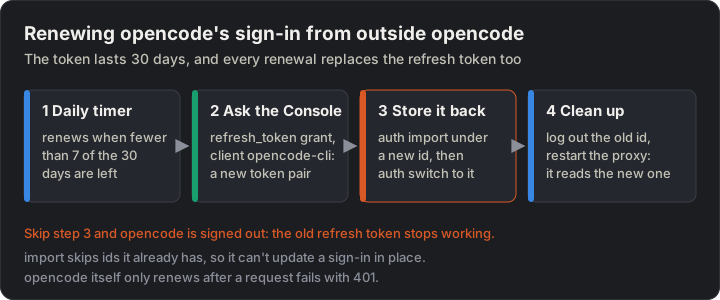
The part opencode doesn’t do for you.
Renewing is one request, the same one opencode makes:
POST https://opencode.ai/console/auth/device/token{"grant_type": "refresh_token", "refresh_token": "<refresh, from the export>", "client_id": "opencode-cli"}It returns a new access_token, a new refresh_token and expires_in in seconds. The catch: the refresh token changes every time, so the new pair has to go back into opencode, or opencode is signed out. And opencode auth import skips any sign-in id it already has, so it can’t update one in place. What works: import the renewed sign-in under a new id, opencode auth switch opencode <new id>, then opencode auth logout opencode <old id>. My script tries that round once with the unchanged sign-in before it renews, because a renewal can’t be undone. A daily systemd timer runs it. It renews once fewer than 7 days are left, then restarts the proxy so it reads the new token.
Go settings worth checking
Section titled “Go settings worth checking”All in the OpenCode Console:
- Privacy → Regions. Europe and the United States are always on. Global adds models hosted elsewhere, and DeepSeek’s Go models refuse to run without it: “This Go model requires Global regions”.
- Privacy → the two “endpoints that train on request data” switches, one for paid and one for free models. I keep both off. With the free one off, the free preview models stop working.
- The Models tab doesn’t control Go. It’s for the pay-as-you-go models: Go models worked while they were switched off there.
- Limits. Each Go model has a monthly dollar limit; any 5 hours can use 20 % of it and a week 50 %. A dictation is a couple of hundred tokens. With Extra usage off, reaching a limit stops requests instead of billing you.
Go is made for coding agents, and its docs say traffic is watched for abuse. Dictations are small requests, so this is light use, but it isn’t what Go is sold for.
Step 6: Pick the model
Section titled “Step 6: Pick the model”Go has about 15 models on /chat/completions. I benchmarked the fast ones, leaving out the free previews and a model whose maker trains on your prompts. Each got Handy’s exact request and my prompt, 4 times, taking turns, with two made-up dictations as Parakeet writes them: the plumber one above, and this one:
so the solar made twenty two kilowatt hours today period the battery was at ninety five percent by noon comma which is pretty good period we should organize a check up of the inverter next weekThe script checked each reply for what it must have (3:30, Thursday, 22, 95%, the Australian “organise”) and mustn’t (um, uh, the the, a spoken “period” or “comma”, a <think> block, “Sure, here’s…”).
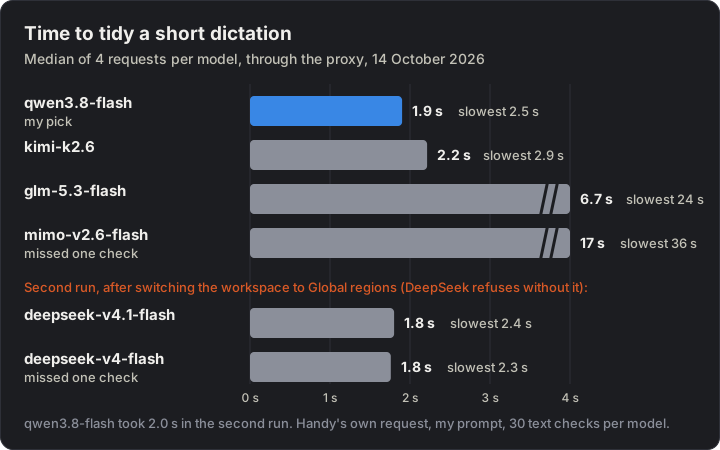
The bars stop at 4 seconds; glm and mimo go well past it.
- qwen3.8-flash was the fastest in the first run and passed all 30 checks. It’s my pick.
- kimi-k2.6 was close behind, and also passed everything.
- glm-5.3-flash and mimo-v2.6-flash wrote good text too, but took up to 24 and 36 seconds.
- Both DeepSeek models refused every request until I switched the workspace to Global regions. Then they were 0.2 seconds faster than qwen3.8-flash, about the difference between two runs of the same model. I stayed with qwen: its text was as clean (one DeepSeek kept the opening “So”), and it doesn’t need models hosted outside the US and Europe.
Every model that answered got the meaning right: “The solar made 22 kWh today. The battery was at 95% by noon, which is pretty good. We should organise a check-up of the inverter next week.” (kimi and glm wrote “22 kilowatt hours”.)
So the clean-up adds about 2 seconds to a dictation. To run it offline instead, any local OpenAI-style server works with the same Handy settings and no proxy: before Go, I ran Qwen3.5-4B in llama.cpp on the laptop’s GPU, at 3 to 4 seconds a sentence.
Where the speech model runs
Section titled “Where the speech model runs”On the GPU. Handy runs Parakeet through its own transcribe.cpp, built on ggml, the engine under llama.cpp, with a Vulkan engine for the GPU. To check yours:
grep -E "bound backend|real-time" ~/.local/share/com.pais.handy/logs/handy.log | tail -3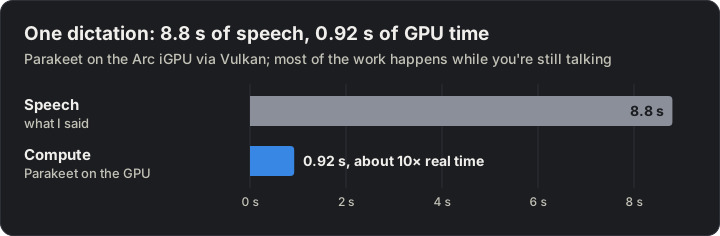
One dictation, from Handy’s log.
That’s about 10 times faster than real time, and most of it runs while you’re still talking. The laptop’s Intel NPU sits idle: Handy has no engine for it, and it would save little, since dictation uses the GPU for about a second at a time.
The microphone
Section titled “The microphone”For the first week I used a USB conference puck. Its levels were fine, but it hears the whole room, and the desk carries every key tap into it. Since 9 October 2026 I use a Hollyland Lark M2, the USB-C version: two wireless clip-on mics in a charging case, and a receiver that plugs into the laptop.
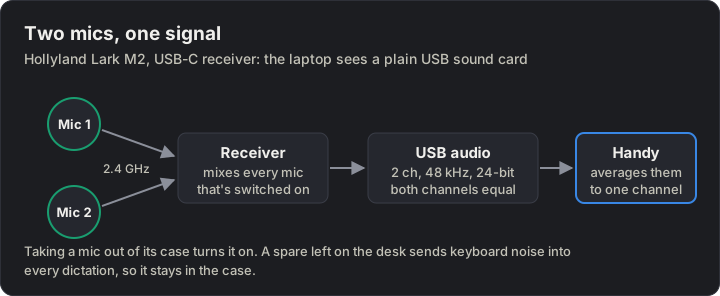
What the laptop actually receives from the Lark M2.
- Nothing to install: the laptop sees an ordinary USB sound card. Pick it by name in Handy (General → Microphone →
Wireless microphone), so calls keep using the built-in mic. - The case is the on/off switch. A mic in the case, or out of range, sends silence while the receiver stays listed. If Handy records nothing, look there first.
- Use a data port. In a USB hub’s power-only USB-C input, the receiver lights up but the laptop doesn’t see it.
- Clip it about a hand-width below your chin, clear of fabric. It hears all around, so nearby voices can end up in a dictation.
- Keep the spare mic in the case, or the receiver mixes its keyboard noise into every dictation.
Sources
Section titled “Sources”- Handy: GitHub (README: Linux and Wayland notes), releases,
llm_client.rs(what post-processing sends) - Parakeet Unified EN 0.6B: NVIDIA model card
- ydotool
- OpenCode Go: docs (endpoints, models, limits, privacy, client headers)
- Hollyland Lark M2 controls: UW iSchool guide
Change history
- : First published.
This guide as plain Markdown, for LLMs and scripts: local-voice-dictation-kde-wayland.md. All posts: API and Markdown.
Text, photos and drawings: CC BY 4.0. Code: MIT. Share and adapt them, crediting HomeLab Guides (blog.jacq.cc). Licence and privacy