Guide
The webcam on a Dell XPS 14 (Panther Lake) under Kubuntu 26.04
Published · Updated
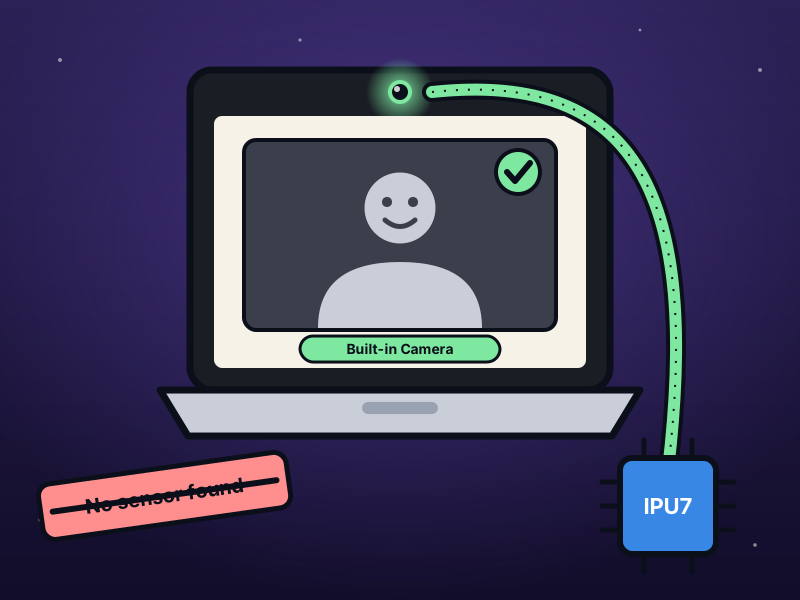
The webcam on my Dell XPS 14 (DA14260, Intel Panther Lake) didn’t work on Kubuntu 26.04. No camera in the browser, and nothing in cam -l either.
So this is how I got it going - one missing kernel driver, a few packages, and a small relay that works around a sensor bug.
How the camera is wired
Section titled “How the camera is wired”Before fixing anything I wanted to know what talks to what. On this laptop it’s a lot more parts than I expected 😅
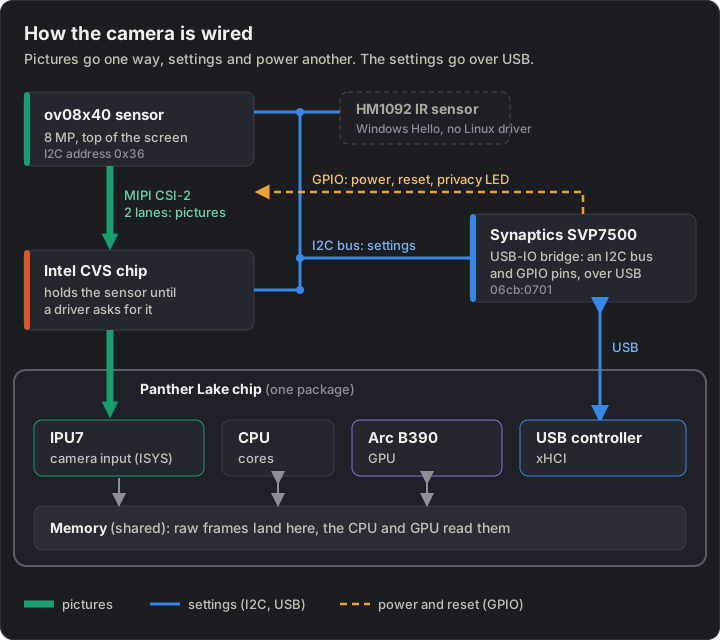
- ov08x40 - the 8 MP sensor at the top of the screen. Sends raw pictures over two MIPI CSI-2 lanes
- IPU7 - Intel’s camera block inside the Panther Lake chip. Its input part (ISYS) takes the raw frames and writes them to memory, and that’s it. It doesn’t make a colour picture, that’s left to software
- Intel CVS chip - sits between the sensor and the IPU7. It can use the camera on its own (for presence detection), so it hangs on to the sensor until a driver asks for it
- Synaptics SVP7500 - a USB-IO bridge. The sensor’s settings go over an I2C bus that belongs to this bridge, so they actually travel over USB. Its GPIO pins switch the sensor’s power, reset and privacy LED. And the CVS chip and the Windows Hello IR sensor are on the same I2C bus as well
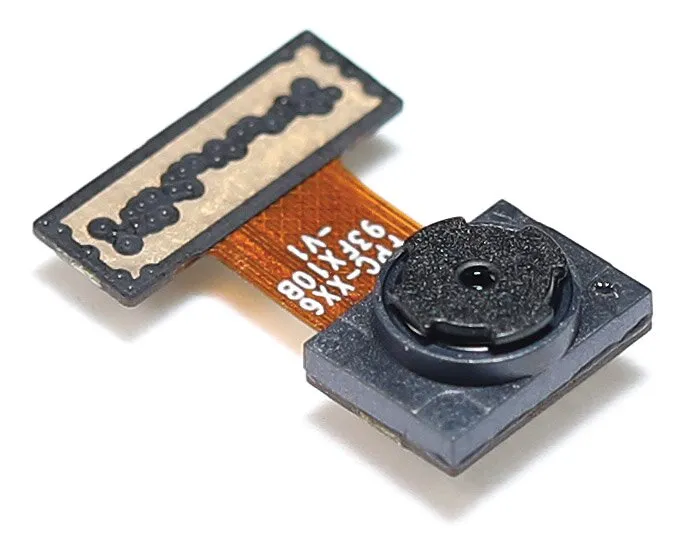
That’s an ov08x40 module like the one in the lid - the sensor and lens in the square block, and a flex cable to the connector, which carries the MIPI lanes, the I2C bus and power.
The Synaptics bridge shows up in lsusb as 06cb:0701 Synaptics, Inc. SVP7500, and the sensor sits under it:
readlink -f /sys/bus/i2c/devices/i2c-OVTI08F4:00# /sys/devices/pci0000:00/0000:00:14.0/usb3/3-3/3-3:1.0/usbio.usbio-i2c.1/i2c-13/i2c-OVTI08F4:00What was wrong
Section titled “What was wrong”Four separate problems, and each one was hiding behind the one before:
- No
intel_cvsdriver. Without it the CVS chip never lets go of the sensor, so the kernel never creates it - No camera software - libcamera’s tools and its PipeWire and GStreamer plugins weren’t installed
- Brave and Edge opened the 32 raw IPU7 capture devices, which never give a picture
- PipeWire crashes below 2560×1440. The sensor’s smaller mode sends broken frames, and libcamera aborts on them
What you need
Section titled “What you need”| Part | Notes |
|---|---|
| Dell XPS 14 DA14260 | Or another Panther Lake laptop with an ov08x40 behind a CVS chip. Check ls /sys/bus/i2c/devices/ for i2c-OVTI08F4:00 and i2c-INTC10E1:00 |
| Kubuntu 26.04 | Ubuntu’s 7.0 kernel. Other Ubuntu 26.04 flavours should work the same, I guess |
| sudo | For the packages |
Step 1: Download the files
Section titled “Step 1: Download the files”Grab them all in one go:
mkdir xps-14-webcam && cd xps-14-webcamfor f in setup-root.sh install.sh camera-relay.service camera-relay.sh camera-relay.desktop 51-camera-relay.conf ov08x40.yaml; do curl -fsSO https://blog.jacq.cc/xps-14-webcam/$fdoneSeven files: setup-root.sh and install.sh set everything up, the other five are what they install. MIT licence (LICENSE).
Step 2: The CVS driver and the camera packages
Section titled “Step 2: The CVS driver and the camera packages”The kernel loads the camera drivers in a chain, and each one waits for the one above it. On a fresh Kubuntu 26.04 the chain just stops at intel_cvs:
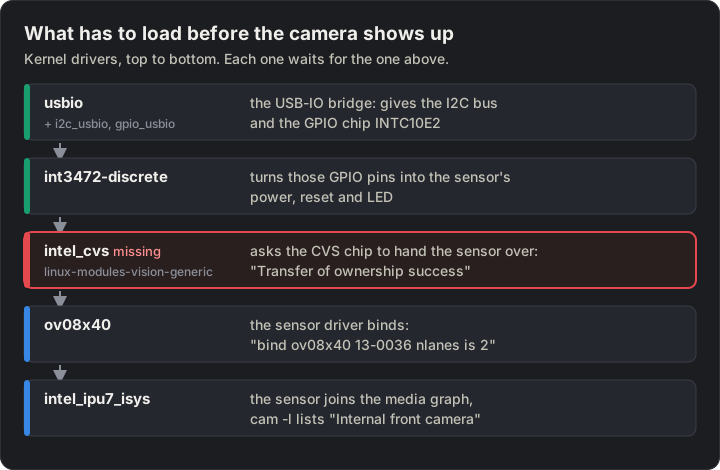
intel_cvs isn’t in Ubuntu’s normal kernel modules - it’s in a separate signed package, linux-modules-vision-generic. Without it, the IPU7 driver knows about the sensor from ACPI (OVTI08F4:00) but never actually gets one, and cam -l says No sensor found for /dev/media0.
bash setup-root.shIt asks for the sudo password and installs:
linux-modules-vision-generic: the CVS driverlibcamera-tools,libspa-0.2-libcamera,gstreamer1.0-libcamera: libcamera, itscamtool and its PipeWire and GStreamer pluginsgstreamer1.0-tools,gstreamer1.0-pipewire:gst-launch-1.0andpipewiresinkfor the relay
It ends with 🟢 SUCCESS. If it says intel_cvs not loaded yet, reboot. Then have a look at the kernel log:
journalctl -k -b | grep -E 'ownership|bind ov08x40'Intel CVS driver i2c-INTC10E1:00: cvs_common_probe:Transfer of ownership successintel_ipu7_isys.isys intel_ipu7.isys.40: bind ov08x40 13-0036 nlanes is 2 port is 0Then ask libcamera:
cam -lOnly the end of the output matters. Here’s mine, with the timestamps cut:
INFO Camera camera_manager.cpp:340 libcamera v0.7.0ERROR V4L2 v4l2_subdevice.cpp:1201 'ov08x40 13-0036': Unable to get rectangle 2 on pad 0/0: Inappropriate ioctl for deviceWARN CameraSensor camera_sensor_legacy.cpp:402 'ov08x40 13-0036': The PixelArraySize property has been defaulted to 3856x2176...WARN CameraSensor camera_sensor_legacy.cpp:427 'ov08x40 13-0036': The sensor kernel driver needs to be fixedWARN CameraSensorProperties camera_sensor_properties.cpp:548 No static properties available for 'ov08x40'WARN IPAProxy ipa_proxy.cpp:192 Configuration file 'ov08x40.yaml' not found for IPA module 'simple', falling back to '/usr/share/libcamera/ipa/simple/uncalibrated.yaml'WARN IPASoft soft_simple.cpp:104 IPASoft: Failed to create camera sensor helper for ov08x40INFO Camera camera_manager.cpp:223 Adding camera '\_SB_.LNK1' for pipeline handler simpleAvailable cameras:1: Internal front camera (\_SB_.LNK1)The ERROR and WARN lines look bad, but the camera works with all of them:
- “Unable to get rectangle” - the ov08x40 driver doesn’t report its crop areas, so libcamera fills in the full 3856×2176 sensor size
- “No static properties” and no sensor helper - libcamera has no entry for this sensor, so it guesses its timings and gain
- “ov08x40.yaml not found” -
camdoesn’t know about the tuning file from Step 5. Only the relay passes it in
At boot the log also shows a whole bunch of int3472-discrete … cannot find GPIO chip INTC10E2:00, deferring. They look like the problem, but they’re harmless: INTC10E2 is the USB-IO bridge’s GPIO chip, and it turns up a moment later.
ubuntu-drivers also suggests intel-ipu7-dkms. You don’t need it - it adds modules for Intel’s own camera stack, not libcamera.
Step 3: Why PipeWire’s own camera crashes
Section titled “Step 3: Why PipeWire’s own camera crashes”With the sensor there, PipeWire shows a libcamera camera straight away. And it works at full size. But as soon as a browser asks for 640×480 or 1280×720, PipeWire crashes.
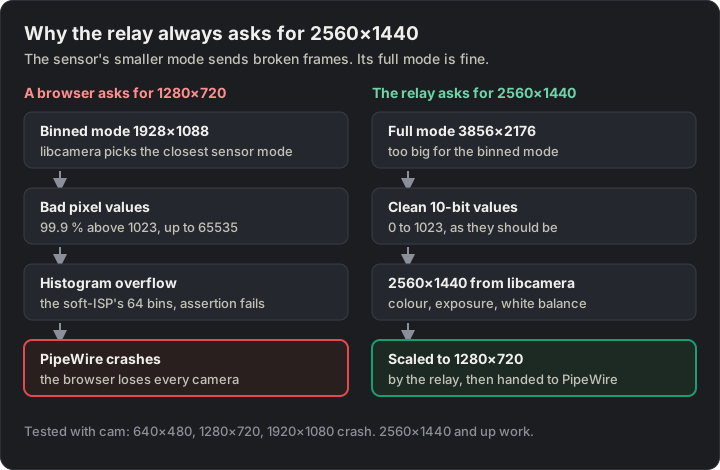
For anything up to 1920×1080, libcamera switches the sensor to its binned 1928×1088 mode. In that mode the raw frames are broken: 2,121,824 of 2,123,776 pixel values were above 1023, the most a 10-bit pixel can hold. So pretty much every pixel. The full 3856×2176 mode is clean. The broken values overflow a 64-bin histogram in libcamera’s software ISP, and Ubuntu’s hardened build aborts on that.
I tested it with cam: 640×480, 1280×720, 1920×1080 and 1924×1088 crash. 2560×1440, 3840×2160 and 3848×2176 work.
I think it’s a bug in the kernel’s ov08x40 driver for the binned mode. I haven’t found a report of it.
So the fix - never let anything ask for less than 2560×1440, and scale down afterwards.
Step 4: The relay
Section titled “Step 4: The relay”The relay is just one GStreamer pipeline, run by a systemd user service. It reads 2560×1440 from libcamera, scales it to 1280×720, and offers that to PipeWire as a camera called “Built-in Camera”.
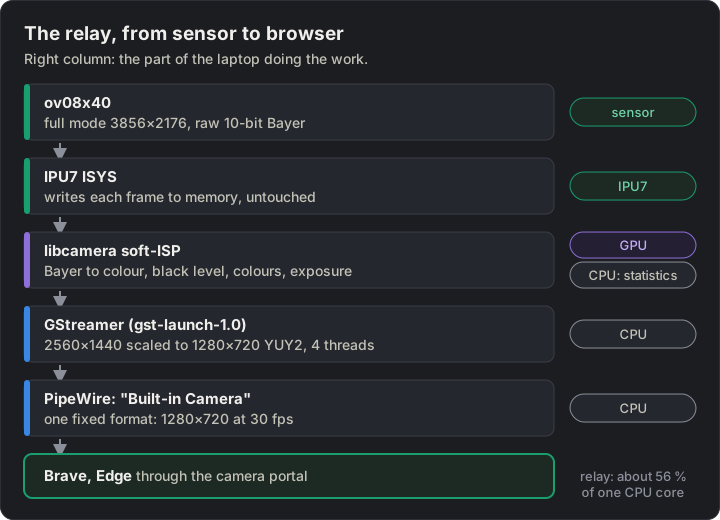
The main bit of camera-relay.service:
gst-launch-1.0 -e libcamerasrc saturation=1.3 \ ! video/x-raw,width=2560,height=1440 \ ! videoconvertscale n-threads=4 \ ! video/x-raw,format=YUY2,width=1280,height=720,framerate=30/1 \ ! pipewiresink mode=provide client-name=camera-relay \ 'stream-properties="props,media.class=Video/Source,media.role=Camera,node.name=camera-relay,node.description=\"Built-in Camera\""'libcamerasrcasks for 2560×1440, which keeps the sensor in its full modevideoconvertscalescales on the CPU, with 4 threadspipewiresink mode=providemakes the relay a PipeWire camera. It offers one fixed format, and that matters: Brave and Edge skip a PipeWire camera that only lists size ranges, withNotFoundError: Requested device not found. My first try used av4l2loopbackdevice, and it failed for exactly that reason
Install it:
bash install.shIt installs the service, the colour tuning file (Step 5), the WirePlumber rules (Step 6), a camera-relay command in ~/.local/bin, and a KDE menu entry “Camera Relay (on/off)”. Then turn it on:
camera-relay start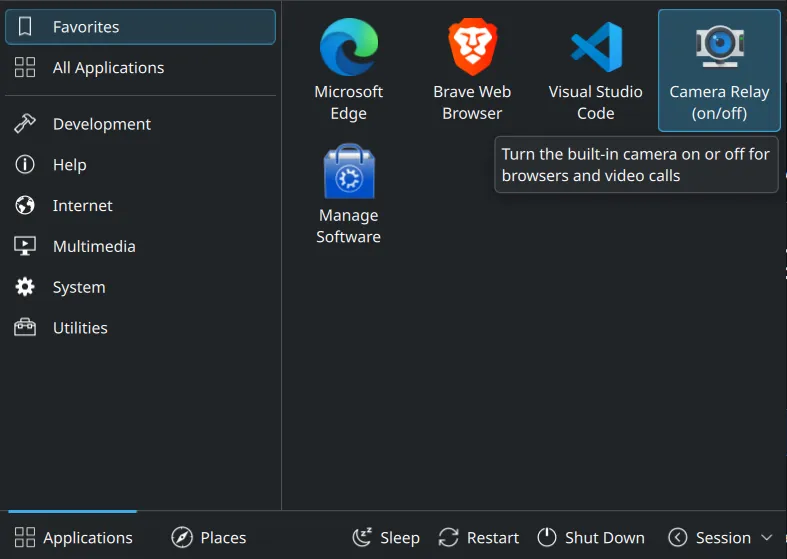
Each start or stop pops up a notification:
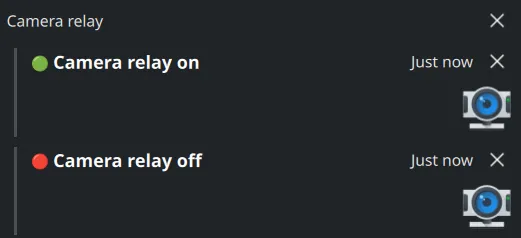
camera-relay stop turns it off, and camera-relay toggle (or the menu entry) flips it. While it runs, the privacy LED is on and the relay uses about 56 % of one CPU core. So I turn it off after a call.
Step 5: Fix the picture
Section titled “Step 5: Fix the picture”The first picture had a yellow-green cast. libcamera has no tuning for this sensor, so it falls back to uncalibrated.yaml, and on mine blue came out about 13 % low. ov08x40.yaml fixes that:
algorithms: - BlackLevel: blackLevel: 4096 # ov08x40: 64 at 10 bit, in libcamera's 16-bit scale - Awb: - Ccm: ccms: - ct: 6500 ccm: [ 1.0, 0, 0, 0, 0.92, 0, 0, 0, 1.28 ] - Adjust: - Agc:The service passes it in with LIBCAMERA_SIMPLE_TUNING_FILE. The colour matrix cuts green a little and lifts blue. I tuned it by eye in office light, so other light might want other numbers. Edit ~/.config/camera-relay/ov08x40.yaml, then camera-relay stop and camera-relay start.
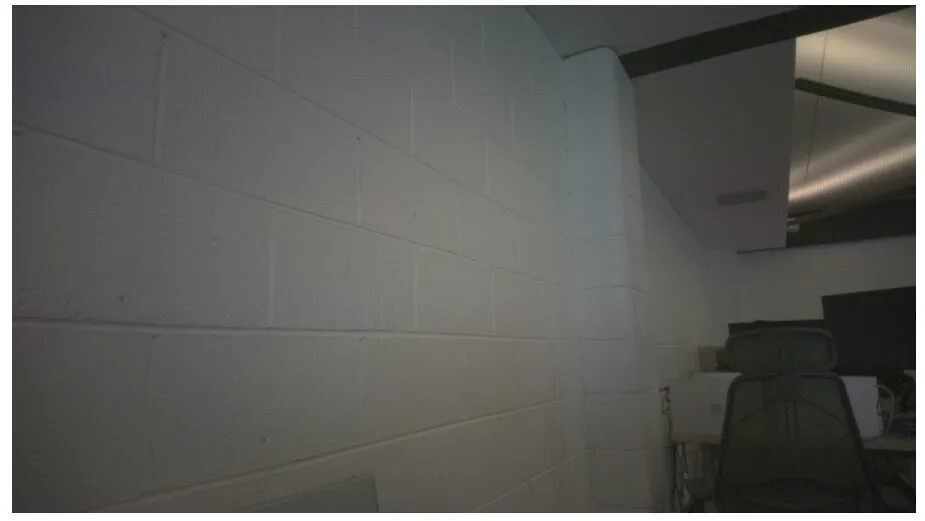
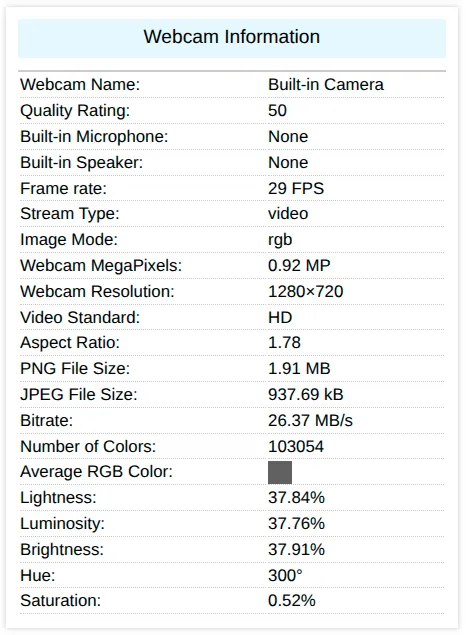
On webcamtests.com, the average colour of the picture went from a hue of 75° (yellow-green) and 15.75 % saturation to under 1 %, so a neutral grey. The picture and the result below are with the tuning file, and that run gave 0.52 %.
Saturation and contrast
Section titled “Saturation and contrast”libcamerasrc takes saturation and contrast (1.0 is no change). The relay runs with saturation=1.3 for a bit more colour.
The catch: the colour matrix has to be in the tuning file for saturation to do anything - with uncalibrated.yaml it had no effect. Contrast works the same way, and I’ve left it at 1.0 for now. To try other values, edit the ExecStart line in ~/.config/systemd/user/camera-relay.service:
gst-launch-1.0 -e libcamerasrc saturation=1.3 contrast=1.1 ! ...Then systemctl --user daemon-reload and restart the relay.
Manual exposure, gain and colour gains do nothing on this sensor. libcamerasrc accepts them and the picture just doesn’t change. libcamera logs Failed to create camera sensor helper for ov08x40 - it has no gain model for it.
Upside down
Section titled “Upside down”The sensor is mounted upside down in the lid. libcamera knows that from ACPI and sets the sensor’s own flip bits, so the picture comes out upright with no videoflip in the pipeline.
Once, the picture showed upside down in Edge, which was weird. After a camera-relay stop and camera-relay start it was upright again, and I haven’t seen it since. I don’t know what caused it.
If it happens to you, restart the relay before you add a videoflip method=rotate-180 - with the flip bits set as well, that would turn a good picture upside down.
Step 6: Get the browsers to use it
Section titled “Step 6: Get the browsers to use it”Chromium-based browsers only look for PipeWire cameras with an option turned on. Without it they open the raw IPU7 devices and get nothing.
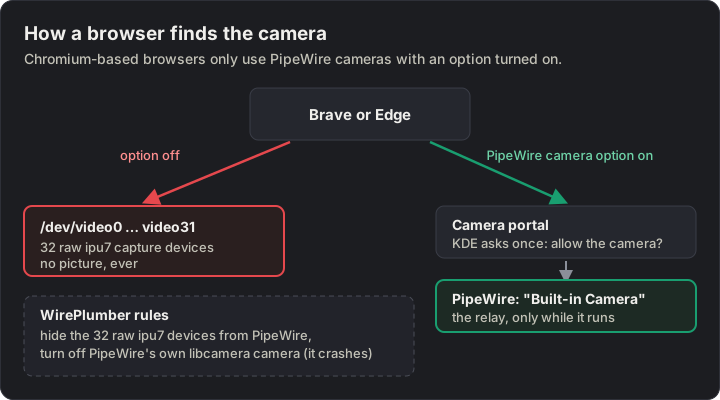
51-camera-relay.conf is a WirePlumber rule that turns off PipeWire’s own libcamera camera (the one that crashes) and hides the 32 raw ipu7 devices. install.sh puts it in ~/.config/wireplumber/wireplumber.conf.d/ and restarts WirePlumber.
Brave - paste this into the address bar, set “PipeWire Camera support” to “Enabled”, and click “Relaunch”:
brave://flags/#enable-webrtc-pipewire-cameraEdge has the same option, but edge://flags doesn’t show it. So install.sh turns it on from the command line instead. It writes a copy of Edge’s launcher to ~/.local/share/applications/microsoft-edge.desktop with this added to the Exec= line:
--enable-features=WebRtcPipeWireCameraKDE uses that copy instead of the system launcher. It only kicks in when Edge starts fresh, so quit it first with “⋯ → Close Microsoft Edge”, then start it from the menu.
Running microsoft-edge --enable-features=… while Edge is open doesn’t work - it just opens a new window in the running Edge, without the option.
To check it worked, open edge://version and look for WebRtcPipeWireCamera in the “Command-line” row.
The first time a site asks for the camera, KDE asks “Allow Apps to Use the Camera?” - click OK.
If PipeWire restarts or crashes while the browser’s open, restart the browser too. Otherwise it hangs on to a dead camera.
Watch out for
Section titled “Watch out for”- BIOS updates - someone with the same model on BIOS 1.12.0 gets no frames at all (omarchy #16792). Mine works on 1.12.0, so I’m not sure what’s different. Check the camera after a BIOS update
- Suspend - on the XPS 16 the sensor is gone after a suspend (omarchy #10624). I haven’t seen it on mine yet. If it happens, reboot
- Grain - in office light the auto-exposure runs the sensor near its longest exposure at about 10× gain, so the picture’s noisy. The binned mode would collect more light per pixel, but that’s the broken one
- The GPU - the software ISP runs on the GPU. I’ve had one KDE graphics hang while the relay ran. KDE hangs on this laptop without the camera too, so I don’t know yet if it’s related
- Apps that read
/dev/video*directly (not through PipeWire) don’t see the relay
When a kernel or libcamera update fixes the binned mode, the relay can go - just delete the WirePlumber rule and PipeWire’s own camera comes back.
camera-relay stoprm ~/.config/systemd/user/camera-relay.service \ ~/.config/wireplumber/wireplumber.conf.d/51-camera-relay.conf \ ~/.local/bin/camera-relay \ ~/.local/share/applications/camera-relay.desktop \ ~/.local/share/applications/microsoft-edge.desktopsystemctl --user daemon-reloadsystemctl --user restart wireplumberSources
Section titled “Sources”- omarchy #10948: ov08x40 missing from the media graph on the XPS 14 DA14260
- intel/vision-drivers #36:
intel_cvsneeded for IPU7 on Panther Lake - CachyOS #804: IPU7 camera on a Panther Lake Dell XPS
- omarchy #16792: XPS 14 DA14260 on BIOS 1.12.0, no frames
- Debian bug #1147085: the CVS driver is in Linux 7.2
Change history
- : First published.
This guide as plain Markdown, for LLMs and scripts: xps-14-panther-lake-webcam-linux.md. All posts: API and Markdown.
Text, photos and drawings: CC BY 4.0. Code: MIT. Share and adapt them, crediting HomeLab Series (blog.jacq.cc). Licence and terms of use ·Privacy policy (no cookies, no tracking)